# Query Guide
Queries are useful when you want to extract a dataset from Rhythm that might include data from multiple apps. Generally,
this data is used to synchronize another system or to populate a cache that you manage. You could then access this data
behind your own APIs. These kinds of queries are usually executed on a regular interval, such as every hour, and may define
criteria to only return records that have been modified in that time.
Depending on the complexity of a query, it may take several seconds to complete. Therefore, queries **are not recommended**
for use-cases where users will be waiting on the query to complete, such as displaying results on a webpage. In those cases,
the recommended approach is to use the specific endpoints in the [API References](/apis), or to run the query periodically and
cache the results behind your own APIs.
## Authentication
Since queries are not recommended for direct user interactions, they are usually executed by a script or other scheduled
process. In these machine-to-machine scenarios, the client credentials authentication flow is required to generate your
access token.
Please review the [authentication](/tutorials/authentication) quick start for more information. **Be sure to cache those tokens
if you are going to execute more than one query per day**.
## Overview
Start by deciding where to store the definition of your query. You can store the query as an asset in your program (static query),
or retrieve it at execution time from the Rhythm API (dynamic query). Below we'll take a look at how those flows differ.
Query Types
A query is specific to a particular **query type**, such as `rolodex:contacts` or `events:functions`.
Different query types usually have different fields available for use in a query. This is why a query that works properly for one
query type may not be valid for a different query type.
Query UI
It is often helpful to use the Rhythm console UI to define your query. This makes it easy to find the query type and fields you are
interested in, as well as to set the default criteria see (see Criteria section below).
### Starting a Query
Once you have your query defined, you can POST it to the [System API > Queries endpoint](/apis/system/system-v1/queries/startquery).
In the URI of this POST, you can specify the query type, as well as the format for results. Valid values include `json`, `csv`,
`excel`, `excelUnformatted`, or `xml`. This POST will start your query and return you the query execution ID.
Performance
The format you choose for your results directly impacts the performance of the `CONVERTING` status of the query. Queries using
`csv` or `json` perform the best.
### Getting Query Results
You can use the query execution ID in the URI of the [System API > Queries endpoint](/apis/system/system-v1/queries/describequery).
This endpoint will return information about the execution including its current `status`. Once the `status` is `FINISHED`,
the response will also include a URL where you can retrieve the query results or metadata about the fields included in the results.
If the query `status` is not yet `FINISHED`, you can delay for a second or two, then retry the request to get the updated
query `status`. Since this polling mechanism is common for long-running tasks on a REST API, there are many libraries
available in major frameworks that will handle this for you. For JavaScript, we recommend using https://www.npmjs.com/package/async-retry
with the following default configuration:
```
{
retries: 10,
factor: 1.25,
minTimeout: 1000,
maxTimeout: 3000,
}
```
## Static Query
Storing your query definition as an asset in your program is useful when your program requires a particular result set.
This puts you in full control of your query definition, which you can even version control.
```mermaid
sequenceDiagram
participant Your code
participant Auth0
participant System API
participant Results storage
Your code->Auth0: Client credentials
Auth0->Your code: Access token
Your code->System API: Query definition + Access token
System API->Your code: Query ID
loop Describe query
Your code->System API: Query ID + Access token
System API->Your code: Query status
end
Note right of System API: Response will include location of
results when the query status is FINISHED.
Your code->Results storage: Request results
Results storage->Your code: Results
```
## Dynamic Query
Retrieving the query at execution time is useful when you want to allow Rhythm console users to easily change the
definition of the query in the future.
Rhythm uses this method for many of our standard integrations. This allows different Rhythm customers to define the criteria
and fields that they are interested in.
The dynamic query flow is similar to the static query, however before the query is started, it is retrieved from the
[Platform API > Saved Queries](/apis/platform/platform-v1/saved-queries) endpoints. The query may then be manipulated
to ensure required fields or criteria are included before you start it.
```mermaid
sequenceDiagram
participant Your code
participant Auth0
participant Platform API
participant System API
participant Results storage
Your code->Auth0: Client credentials
Auth0->Your code: Access token
Your code->Platform API: Saved query ID + Access token
Platform API->Your code: Query definition
Your code->System API: Query definition + Access token
System API->Your code: Query ID
loop Describe query
Your code->System API: Query ID + Access token
System API->Your code: Query status
end
Note right of System API: Response will include location of
results when the query status is FINISHED.
Your code->Results storage: Request results
Results storage->Your code: Results
```
## Criteria
Whether you are storing the query definition in your source code or retrieving it at runtime, it is often helpful to
override the criteria before executing your query. You might do this to only retrieve records that have been modified
since the last time the query was executed.
Every query has an optional `criteria` attribute which uses [JSON Rules Engine](https://www.npmjs.com/package/json-rules-engine)
syntax. Because this syntax is recursive, the criteria property only appears with the type `object` in the [Queries API Reference](/apis/system/system-v1/queries)
documentation and samples.
If you are having trouble defining your criteria, we recommend using the Rhythm UI to build a query definition. You
can use your browser's inspector to see how different options change the query definition. To get access to the Rhythm console,
please log a ticket in [ZenDesk](https://support.rhythmsoftware.com).
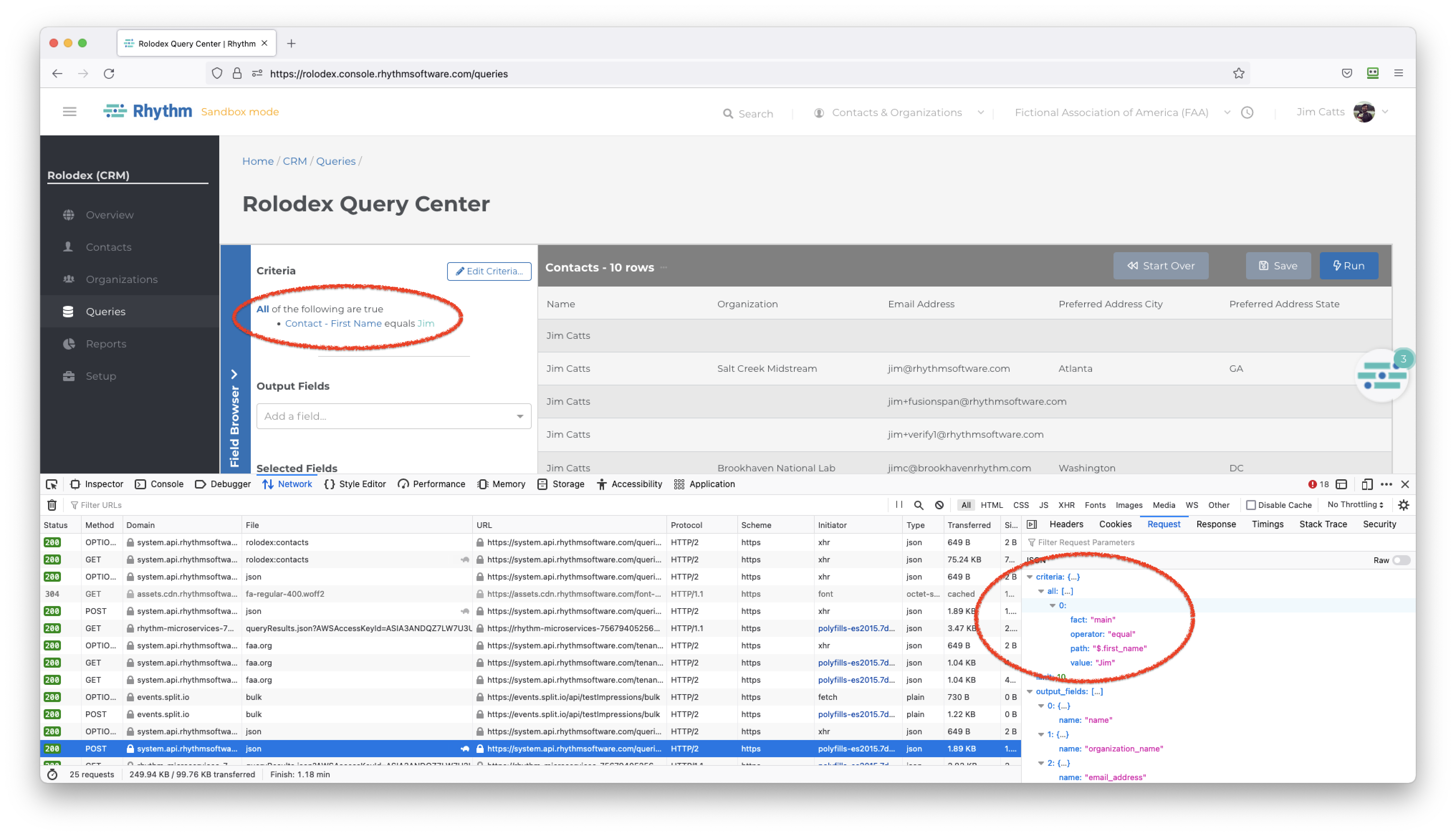
Alternatively, you can save your query and retrieve it from the API using the [Platform API > Saved Queries](/apis/platform/platform-v1/saved-queries)
endpoints.
**Grouping**
The criteria object begins with a grouping. This can be an `any` group *(OR)* or an `all` group *(AND)*. Both groups
are `arrays` which contain the individual criteria objects to examine for this group. Every criteria object in
this group can optionally define their own `any` or `all` arrays to support nested grouping.
**Fact**
Every criteria must specify a `fact` which refers to the table that contains the data to compare. `fact` values
must correspond to a `table_alias` value from the query type being executed.
**Operator**
Every criteria must specify a `operator` to use in comparison. `operator` can be one of:
- `equal`
- `notEqual`
- `containsString`
- `regex`
- `lessThan`
- `lessThanInclusive`
- `greaterThan`
- `greaterThanInclusive`
- `in`
- `notIn`
- `contains`
- `doesNotContain`
- `isBlank`
- `isNotBlank`
**Path**
Every criteria must specify a `path` identifying the field to compare using *JSON Path*. This might be a value like `$.first_name`.
**Value**
Every criteria must specify a `value`. How this value is compared to the field defined in `fact` and `path` is determined
by the `operator` you select.
## Examples
### Criteria
You can combine multiple criteria such this example criteria object:
```json
{
"all": [
{
"any": [
{
"path": "$.first_name",
"fact": "main",
"value": "Tony",
"operator": "notEqual"
},
{
"path": "$.last_name",
"fact": "main",
"value": "Stark",
"operator": "equal"
}
]
},
{
"path": "$.rolodex_contacts__company_name__c",
"fact": "main",
"value": false,
"operator": "isNotBlank"
}
]
}
```
### Query
The following is an example query definition for the `rolodex:contacts` query type. This JSON can be sent as the body of a `POST`
to `https://system.api.rhythmsoftware.com/queries/{tenantId}/start/rolodex%3Acontacts/json` to start a new query:
```json
{
"output_fields": [
{
"name": "name"
},
{
"name": "organization_name"
},
{
"name": "email_address"
},
{
"name": "preferred_address__city"
},
{
"name": "preferred_address__state"
},
{
"name": "rolodex_contacts__company_name__c",
"label": "Company Name"
},
{
"name": "rolodex_contacts__companyname__c",
"label": "companyName"
}
],
"name": "Contacts with Organization and Company Name",
"sort_fields": [
{
"name": "name"
}
],
"criteria": {
"all": [
{
"path": "$.rolodex_contacts__company_name__c",
"fact": "main",
"value": false,
"operator": "isNotBlank"
}
]
}
}
```